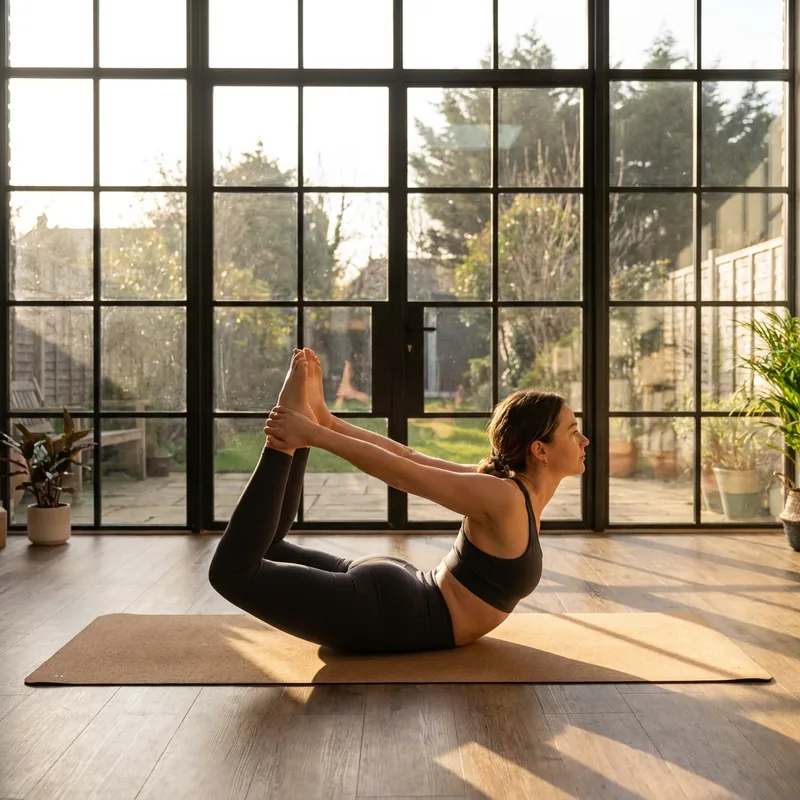
A face-down backbend holding the ankles to lift the body like a bow.
Level: Intermediate · Hold: 25 seconds · Type: Backbend · Target areas: Spine & Back, Chest, Legs & Hamstrings
Benefits ✨
- Strengthens the entire back
- Opens the chest and shoulders
- Stretches the abdomen
Step by step 🧘
1) Lie face down, bend your knees, and grab your ankles.
2) Inhale and lift your chest and thighs at the same time.
3) Press your feet into your hands to form a bow shape.
4) Open your shoulders, gaze forward, and breathe.
Breathing and cautions 🌬️
Inhale to lift the chest and thighs together.
- Practice one side at a time if the lower back feels strained
How Yoga Play recognizes Bow Pose 📱
Yoga Play finds your shoulders, elbows, wrists, hips, knees, and ankles in the camera image, then measures the height and angle of each joint relative to your torso length and compares them with the rules for the pose. When every rule is met, the skeleton turns green and the hold timer starts running.
If you drift out of the pose, hints like these appear on screen:
- Lift your chest higher
- Kick your shins up and back
- Reach back and hold your ankles
Joint angles read from the sample photo above: knee about 84°, hip about 111°, elbow about 167°. These come from a single photo, so they vary with body proportions and camera angle.
This sample photo passes every recognition rule in the app, so the skeleton is drawn in green.
Related guides 🔗
A good pose to follow with: Child's Pose
A resting pose that folds the torso forward over kneeling legs to release the whole body.
Yoga Play Pose Guide - All 26 Yoga Poses at a Glance
Browse all 26 yoga poses by level, each with the skeleton recognized by the app.